How to find your Brawl Stars player tag
By La Parka · Updated November 18, 2026
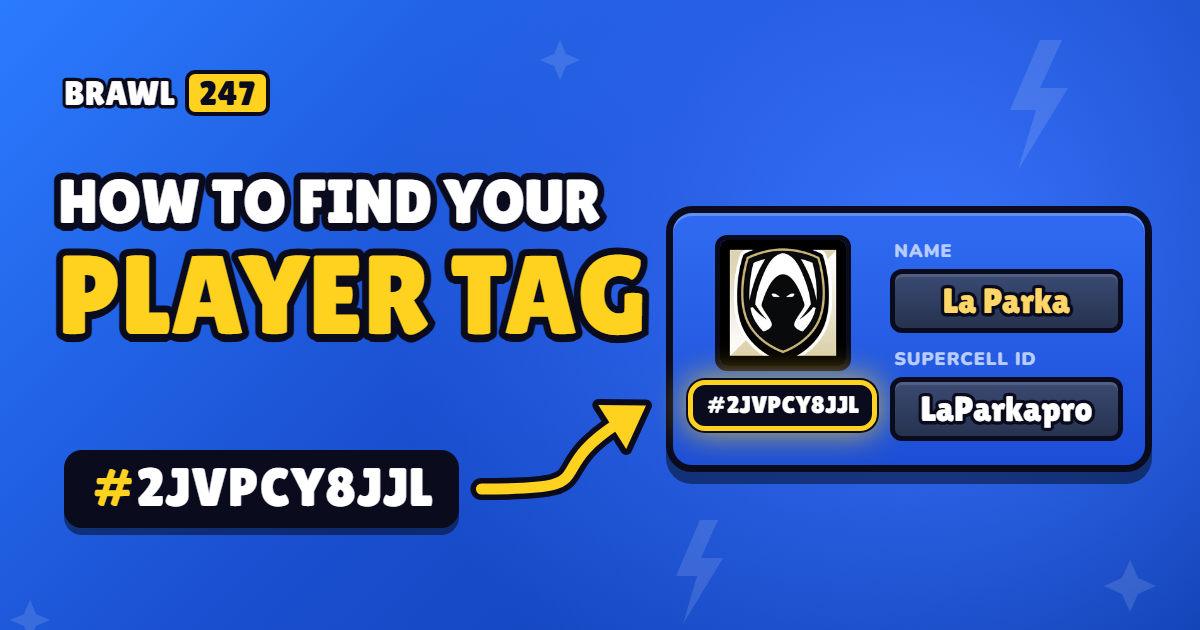
Every Brawl Stars account has a player tag: a code that starts with # and never changes, even if you change your name. You can use it to look up your stats on BRAWL247, add friends or share your profile.
Where to find your tag
- Open Brawl Stars.
- On the main screen, tap your profile icon in the top-left corner.
- Your profile opens. Your tag is on the left, right below your player icon.

In this example, the tag is #2JVPCY8JJL. You can see this profile on BRAWL247 to check what it looks like.
Don’t confuse your tag with the two names to its right: the top one is your in-game name (you can change it) and the bottom one is your Supercell ID name. Neither of them can be used to look you up, but your tag can.
Tap your tag and the game copies it to your clipboard, so you can paste it straight into the player search.
Which characters a tag can contain
Tags only use these characters: 0 2 8 9 P Y L Q G R J C U V. They never contain the letter “O” (it’s always a zero) or the letter “I”.
If the search says your tag isn’t valid, check for these common mistakes:
- You typed the letter O instead of a zero (0). BRAWL247 fixes this automatically, but other sites don’t.
- A character is missing, or you typed one twice when entering the tag by hand.
- There are extra spaces at the start or the end.
You don’t need to type the #: the search adds it for you.
What your tag is for
- See your stats: trophies, your trophy record, wins by mode and every Brawler with its Power Level.
- Check your recent battles: the game keeps your 25 most recent battles.
- Add friends: you can search for someone by their tag from the in-game friends menu.
Is it safe to share?
Yes. A tag only shows public profile information, the same things anyone sees when they tap your name in the game. It doesn’t give anyone access to your account. What you must never share is the Supercell ID verification code that’s sent to your email.